
Device Management Application (DMA)
Find out how the MOE Device Management Application helps manage students' device use and safeguard their cyber wellness, and how to choose the right after-school settings for your child.
MOE Device Management Application (DMA)
A Device Management App (DMA) will come pre-installed on all chromebook PLDs purchased through the school and will be installed on any student-owned chromebook parents/guardians opt for the student to use.
The DMA has 3 main components which will support the use of the PLD in the classroom and safeguard students’ cyber wellness:
Classroom Management Service. To help teachers manage students’ use of the PLD during lesson time to improve classroom management and support effective teaching and learning.
Mobile Device Management Service. To help update and manage the PLD, protect the PLD from malicious software, and protects students from objectionable internet content.
Usage Management Service. To enable school and/or parents/guardians to better supervise and set helpful limits for students’ use of PLD after school.
MOE DMA Settings After-School Hours
For parents/guardians who prefer alternative DMA settings after-school hours, they can choose from the following options:
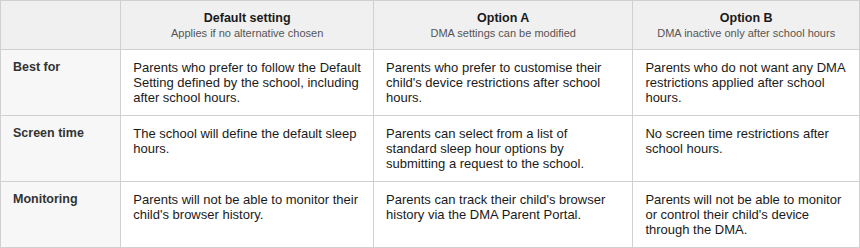
The after-school hours are as follows:
MOE DMA settings by school day type and time period
School hours | After-school hours | |
|---|---|---|
Regular school days | Default settings between 6:30 a.m. to 3 p.m. | Parents’/Guardians’ after-school option between 3 p.m. to 6:30 a.m. |
Weekends and School Holidays | Parents’/Guardians’ after-school DMA option for the whole day | |
Change of After-School Device Management Application (DMA) Option
Parents/Guardians may wish to consider the following questions before deciding which alternative DMA settings is best for their child/ward.
Child’s/Ward’s current device usage habits
How much time does my child/ward spend on his/her device?
How well can my child/ward self-regulate his/her device usage?
Does my child/ward become easily distracted during online learning?
Parents can select their choice of after-school DMA parent option via the online form at https://go.gov.sg/acsbr-parent-dma-option (opens in new tab).